

Looking to login to your Mbet account? Existing Mbet customers can access their account using the mobile number or email address registered to their account, together with their password. The same Mbet login gives you access to your account on mobile or desktop, including your balance, bets, deposits, withdrawals and account settings. In this Mbet login guide, we’ll show you how to access your account, what to do if you’ve forgotten your password, and how to resolve common sign-in problems. If you haven’t joined yet, we’ll also point you towards our Mbet registration guide to help you create an account.
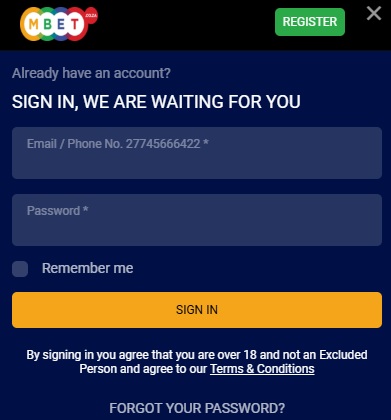
Mbet Login Guide
It’s quick and easy to login to your Mbet account, as long as you currently have an active accout, follow these steps to login;
- Visit the official Mbet site on www.mbet.co.za
- Click on the sign in button at the top of the page to bring up the login screen
- Enter your phone number or email and your Mbet password and click login
- If the details were entered correctly you’ll be logged in your Mbet account
If your details are correct, you’ll be signed into Mbet and can access your account immediately. If you’ve forgotten your password, use the Forgot Password option rather than repeatedly attempting to login with different details.
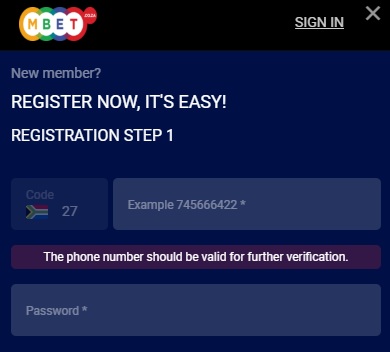
How to register with Mbet
It’s simple to register with Mbet from your phone. You can register a new account by clicking on the “Register” button on the top right of the site. The registration is quick and easy and comprises 3 steps.
Step 1: Open the MBet Registration Page
Visit the MBet website and select the Sign Up option to open the registration form.
Step 2: Enter Your Mobile Number
Enter your active South African mobile number. MBet will send a one-time PIN (OTP) to this number so it can be verified.
Enter the OTP when it arrives to continue with your registration. If you don’t receive it, check that your mobile number is correct and use the resend option.
Step 3: Add Your Personal Details
Complete the registration form with the personal information requested by MBet, including your first name, surname and email address.
Make sure you enter your information correctly, particularly details that will later need to match your identification documents during FICA verification.
Step 4: Create Your MBet Password
Choose a secure password for your new account and confirm it when prompted. This is the password you’ll use together with your registered mobile number or email address when completing an MBet login.
Step 5: Accept the Terms and Create Your Account
Review your details, confirm that you’re over 18 and accept MBet’s terms and conditions if you’re happy with them. Submit the registration form to create your account.
Once registration has been completed successfully, you can log in to MBet and access your new account. If you’d like to know more about Mbet before you sign up then check out our Mbet review.

The Gambler’s Thoughts on the MBet Login
The MBet login process is straightforward once your account has been created. You can access your account using the mobile number or email address registered with MBet together with your password, whether you’re logging in from your phone or computer. From there, My Account gives you access to your balance, betting history, deposits, withdrawals and account settings.
If you can’t login, the Forgot Password option should be your first stop, as MBet allows you to verify your account with an OTP and create a new password. For players who haven’t joined yet, our MBet registration guide takes you through the sign-up process from start to finish.
For more help choosing where to play, have a look at The Gambler’s guide to the best betting sites in South Africa. You can also check the latest no deposit free spins offers currently available to South African players.

Mbet Questions Answered
How do I access my account?
Once you have opened an account, you can sign into your account by clicking on the “LOGIN” button on the top right of the site. Enter your username specified during Sign Up (email address or mobile number) and your chosen password in the areas provided. Finally click the “LOGIN” button to complete the sign in process.
What do I do if I forget my password?
You can reset your password by clicking on the “Forgot Password” link when signing in. You will need to verify your account first by specifying your username specified during registration (email address or mobile number) so that you can receive an OTP (one-time pin) to verify that it is you attempting to change your password.
Enter the OTP received and specify a new password and confirm your new password and then hit the “Continue” button. Your password will be changed, and you will be automatically signed into your account.
Can I change my password after registration?
You can change your password at any time under the “Change Password” section of “My Account”, on the “My Profile” page. Specify your current password and your new password and then click “Update” to update your password. We encourage you to change your password frequently and to use passwords that are not easy to guess. Please remember to keep your sign in details a secret and do not share them with anyone.
Can I change my username?
Changing your username (email address or mobile number) is possible, especially if your email address or mobile number is changing. Sign into the site with your existing username and password and go to the “Details” section of “My Account”, on the “My Profile” page. In the username field, specify your new email address or mobile number. Please note that you cannot change your username type from an email address to a mobile number or visa versa. If you joined originally with an email address, you must continue to use an email address as your username (the same applies if you originally joined with a mobile number.)
Click the “Change Username” button to complete the change username process. An OTP (one-time pin) will be sent to the new username provided (email address or mobile number), enter the OTP received and click on the “Verify” button to continue. You will be required to sign in again to the site with your new username.

Warren’s been in the betting game for over 15 years, testing sites, chasing bonuses, and figuring out what actually pays and what doesn’t. He’s spent plenty of time on Spina Zonke, with Hot Hot Fruit being a long-time favourite. At The Gambler, he shares real, straight-talking insights to help South African players get more value from their play and stay away from the sites that aren’t worth it.