

Looking for the World Sports Betting login? Existing WSB customers can access their account using the username and password created during registration. You can login to World Sports Betting from your mobile phone or computer, giving you access to your balance, sports betting, Spina Wina games, Lucky Numbers, deposits, withdrawals and other account features. In this updated WSB login guide, we’ll show you how to login to your World Sports Betting account on mobile and desktop, reset a forgotten password, troubleshoot common login problems and register a new account if you haven’t joined yet.
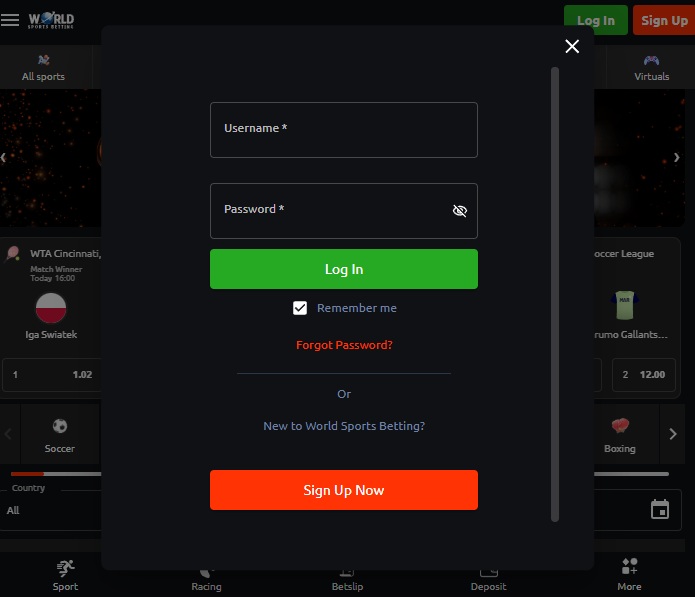
World Sports Betting Login to My Account
Given that many people prefer to bet on their mobile devices, let’s start by explaining the process for logging into your World Sports Betting (Worldsportsbetting) account on an Android or iOS device.
To log in to your World Sports Betting account on your phone or tablet:
- Open the World Sports Betting mobile website on www.wsb.co.za
- Tap the green “Login” button located in the middle of the top of the screen.
- Enter the username and password that you created during the registration process.
- Toggle the “Save” bar to “Yes” if you want your password to be auto-completed next time you log in.
- Tap the “Login” button to complete your mobile login.
- You are now logged in and ready to start betting.
Once you’ve completed your World Sports Betting login, you can use the My Account area to manage your betting account. This includes checking your balance and transactions, managing deposits and withdrawals, viewing account information and accessing the different betting products available through WSB.

World Sports Betting Login on Desktop
Although many users prefer to bet on mobile, some may prefer to use desktop because of the larger screen and live streaming options.
Here’s how to log in to your World Sports Betting account on your computer:
- Open the World Sports Betting desktop website.
- Click the green “Login” button located in the middle of the top of the screen.
- Enter the username and password you created during the registration process.
- Click the “Login” button to complete your login.
- You are now logged in and ready to start betting.

Forgot Your WSB Login Password?
If you’ve forgotten or lost your World Sports Betting password, don’t worry. Simply go to the homepage and select “Login” near the top, then click on the “Forgot Login?” link. You will then receive an SMS or email with instructions on how to reset your password. Follow the steps to regain access to your account.
WSB Login Not Working?
If your WSB login isn’t working, start by checking that you’ve entered your username and password correctly. Select the eye icon beside the password field if you want to check what you’ve typed before trying again.
If your details are correct but you still can’t access your account, try refreshing the page, clearing your browser cache and cookies or using another browser or device. You can also switch between Wi-Fi and mobile data to rule out a connection problem.
If World Sports Betting says your password or login details are incorrect, use the Forgot Login option rather than repeatedly guessing your password. Account restrictions, FICA verification problems or a suspended account will generally require assistance from WSB customer support. If you’re still experiencing login issues with World Sports Betting, you can contact customer support through the following channels:
- Tel: 011 326 3633 Email: support@wsb.co.za WhatsApp: 079 712 0818 An agent will be available to assist you with resolving the problem.

How to register with World sports betting
If you’ve already registered with World Sports Betting, you can skip this step and go directly to the World Sports Betting mobile login section below. However, if you’re a new customer, registering with WSB is quick and easy. Follow these simple steps to get started:
- Go to the World Sports Betting website on your desktop or mobile device.
- Click the “Register” or “Sign Up” button at the top of the page, or use this link.
- Fill out the registration form by entering your personal information such as your first name, last name, date of birth, country, email address, mobile number, ID number, and physical address. You’ll also need to create a username and password.
- Review your information to make sure it’s accurate and then click “Register” to complete the process.
- You will receive an SMS with instructions on how to activate your account.
- Once you’ve completed these steps, you now have an online account with World Sports Betting. Additionally, as a new customer, you can get a 100% First Deposit Bonus up to R10 000, plus a R50 free bet by submitting your FICA documents.
The Gambler’s Thoughts on the World Sports Betting Login
Logging in to World Sports Betting is a simple process whether you’re using your mobile phone or desktop. Once you’ve entered the username and password created during registration, you’ll have access to your WSB My Account area, where you can manage your balance, deposits and withdrawals, view your account information and access the different betting products available on the site.
If your WSB login isn’t working, we’d recommend checking your details first before resetting your password. The “Forgot Login?” option should solve most password-related problems, while World Sports Betting customer support can help if you’re dealing with an account, verification or technical issue.
For more information about the bookmaker, check out our complete World Sports Betting review or visit The Gambler for our latest South African betting guides, reviews and promotions. You can also compare the latest no deposit free spins offers available to new players.

World Sports Betting Login FAQs
How do I login to World Sports Betting?
Visit the World Sports Betting website, select the green Login button and enter the username and password you created when registering. Select Login again to access your WSB account.
Can I login to World Sports Betting on my phone?
Yes. You can complete your WSB login directly through the World Sports Betting mobile website on an Android phone, iPhone or tablet. You use the same username and password as you would on desktop.
What do I do if I forgot my WSB password?
Select Login on the WSB website and choose the “Forgot Login?” option. Follow the instructions provided by World Sports Betting to reset your details and regain access to your account.
Why is my World Sports Betting login not working?
First check that your username and password have been entered correctly. If you still can’t login, try resetting your password. Account verification or technical issues may require assistance from WSB customer support.
Where can I find World Sports Betting My Account?
The My Account section becomes available after you’ve successfully logged in. From here you can access your balance, transactions, deposits, withdrawals and other account information.
Can I register a new World Sports Betting account online?
Yes. New customers can register through the World Sports Betting website on either mobile or desktop. You’ll need to provide your personal and contact information and create a username and password before completing the registration process.
Can I use the same WSB login on mobile and desktop?
Yes. Your World Sports Betting account isn’t tied to a particular device. You can use the same username and password to login on your mobile phone, tablet or desktop computer.

Warren’s been in the betting game for over 15 years, testing sites, chasing bonuses, and figuring out what actually pays and what doesn’t. He’s spent plenty of time on Spina Zonke, with Hot Hot Fruit being a long-time favourite. At The Gambler, he shares real, straight-talking insights to help South African players get more value from their play and stay away from the sites that aren’t worth it.