

Trying to log into your BetXchange account? Whether you’re returning to check your bets, make a deposit, play your free spins or simply check your balance, accessing your BetXchange My Account area is quick once you know where to go.
BetXchange is one of South Africa’s established licensed bookmakers, offering sports betting, horse racing, slots, casino games and Lucky Numbers from the same account. You can log in from either your mobile phone or desktop, and you don’t need the BetXchange app to access your account.
In this updated BetXchange login guide, we’ll show you how to sign in, reset a forgotten password, register a new account and troubleshoot some of the most common login problems. We’ll also cover the latest BetXchange sign-up offer, which currently gives new players 100 free spins plus a R25 free bet just for registering.
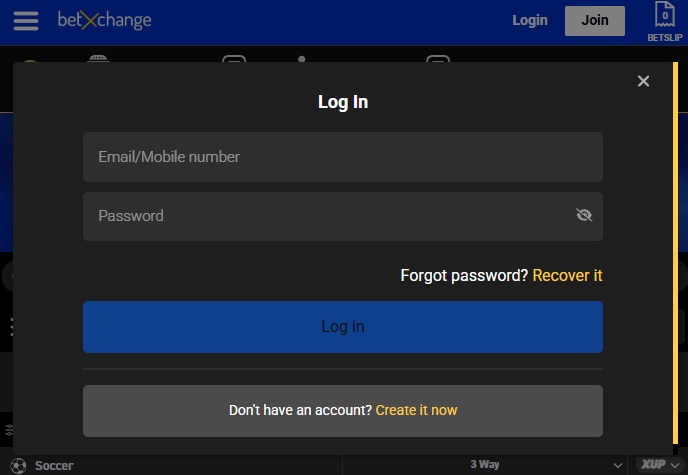
How to Login to Your BetXchange Account
If you already have a BetXchange account, you can access it through the main BetXchange website using the login details you created when registering.
- Visit the BetXchange website at www.betxchange.com from your mobile phone, tablet or computer.
- Select the Login button at the top of the page.
- Enter your registered BetXchange username and password.
- Check that you’ve entered your details correctly.
- Select Login to access your BetXchange My Account area.
Once you’re logged in, you’ll be able to view your balance, access your promotions, place bets, play casino games and manage deposits and withdrawals.
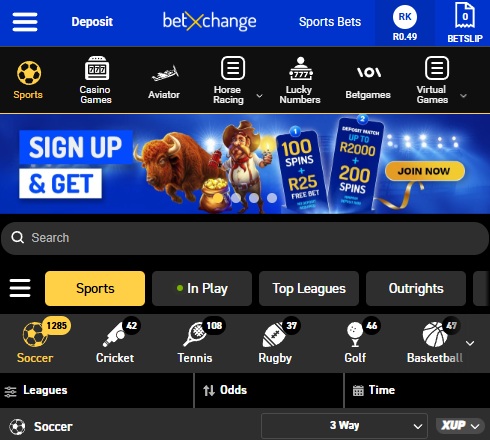
BetXchange Mobile Login
You don’t need to be sitting at a computer to access your account. BetXchange can be opened directly through the browser on your Android phone, iPhone or tablet.
Open the BetXchange website in Chrome, Safari or your preferred browser, select Login and enter the same username and password you normally use. There isn’t a separate BetXchange mobile account, so your balance, bets and account information remain exactly the same across devices. For players who use BetXchange regularly, there’s also a dedicated BetXchange app available. The app uses your existing account details, so you don’t need to register again.
BetXchange App Login
If you’ve downloaded the BetXchange app, logging in works much the same way as it does through the website. Open the app, select Login and enter your existing BetXchange username and password. Once authenticated, you’ll have access to your normal account and balance.
There’s currently an extra reason to consider downloading the app. BetXchange’s Download and Spin promotion gives qualifying customers 50 free spins for downloading the BetXchange app. The spins are worth R0.20 each and are available on Jelly Express, with the promotion currently scheduled to run until 31 December 2026.

Forgotten Your BetXchange Password?
Forgetting your password doesn’t mean you need to open another BetXchange account. In fact, creating a second account can cause unnecessary verification problems. Go to the BetXchange login screen and select the Forgot Password option. Follow the instructions provided to verify your account and reset your password.
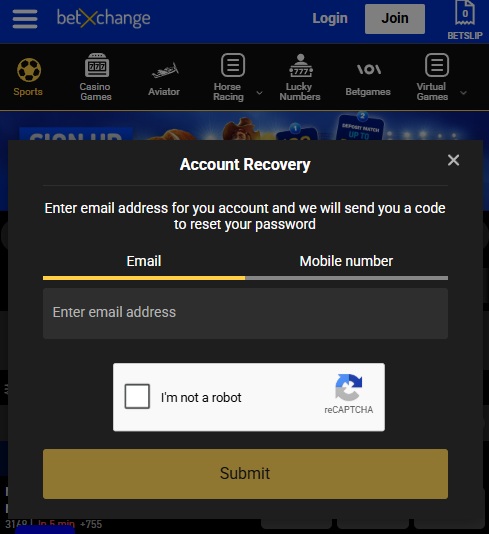
Once you’ve created a new password, return to the login page and try signing in again. If you no longer have access to the contact information associated with your account, contact BetXchange customer support rather than repeatedly attempting to log in.
BetXchange Login Not Working?
If your BetXchange login isn’t working, start with the basics. Check your username and password carefully and make sure you haven’t accidentally added a space or entered the wrong details. If you’re certain your login information is correct, refresh the page and try again. You can also clear your browser’s cache and cookies, switch browsers or try logging in from another device.
A temporary internet or website problem can also prevent the login page from loading correctly. Switching between Wi-Fi and mobile data can help determine whether the problem is with your connection. If BetXchange says your password is incorrect, use the password reset option rather than repeatedly guessing. For account restrictions, FICA problems or an account that has been suspended, you’ll generally need assistance from BetXchange support.
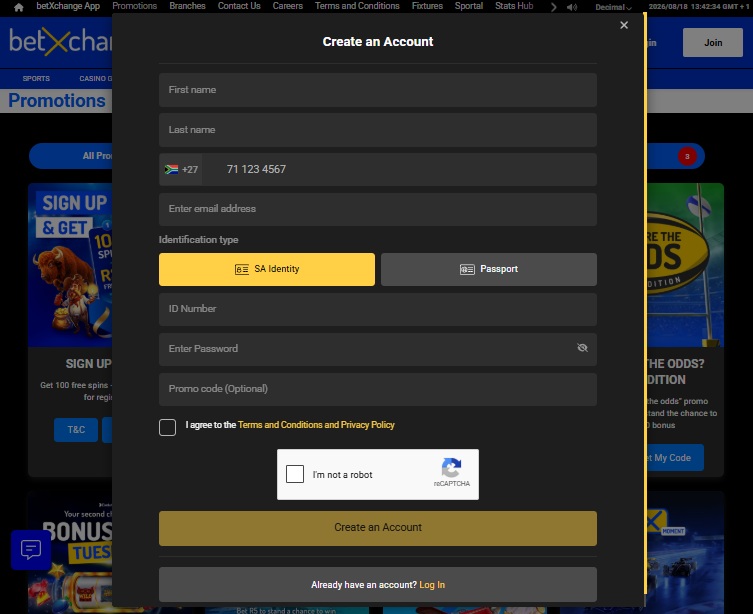
How to Register a New BetXchange Account
If you don’t have a BetXchange account yet, registration can be completed online from your phone or computer. You’ll need to provide your personal and contact details, create your username and password and complete the required account verification. We’ve covered the full process, including the latest welcome offer, in our BetXchange registration guide.
Get 100 Free Spins When You Register
There’s a pretty good reason to open a BetXchange account at the moment. New customers currently receive the Betxchange Welcome offer of 100 free spins on selected Pragmatic Play games plus a R25 free bet simply for successfully registering using promo code BSBZA.
The 100 free spins are valued at R0.25 each, giving you R25 worth of spins. The R25 free bet is credited to your bonus wallet within 24 hours and has a 1x wagering requirement. There’s no deposit required for this first stage.
New players can then unlock the second part of the welcome offer by making a single deposit of R100 or more within 30 days of registration. This gets you another 200 free spins plus a 100% deposit match bonus of up to R2,000. Complete both stages and you’re looking at up to 300 free spins, a R25 free bet and as much as R2,000 in matched bonus funds.

BetXchange My Account
Once logged in, your BetXchange My Account area is essentially the control centre for your betting account.
This is where you can keep track of your balance and transactions, manage deposits and withdrawals, check promotions and access your account information. Your account also gives you access to the different betting areas on BetXchange, rather than requiring separate logins for sports and casino games.
BetXchange continues to offer betting across major sports as well as live betting, while its Lucky Numbers section includes fixed-odds draws such as SA Daily Lotto and UK49s.
Do I Need to Complete FICA?
Yes. As with other licensed South African betting sites, account verification is an important part of using BetXchange, particularly when you want to withdraw money. Make sure the information entered when registering matches your identification documents. Incorrect names, ID numbers or other details can make verification unnecessarily difficult later. Getting FICA sorted early is preferable to waiting until you’ve requested your first withdrawal and discovering that additional documents are required.
The Gambler’s Thoughts on the BetXchange Login
There’s nothing particularly complicated about accessing your BetXchange account. Whether you’re using your phone, desktop or the BetXchange app, you’re using the same account and login details, which makes moving between devices straightforward.
If you can’t get in, don’t immediately assume there’s something wrong with your account. Check your username and password first, try the password reset option and make sure your browser or internet connection isn’t causing the problem. If you’re still locked out after that, BetXchange customer support should be your next stop.
For new players, the current welcome offer also makes this a good time to register. You can start with 100 free spins and a R25 free bet without depositing, then unlock another 200 spins and a 100% match up to R2,000 with a qualifying R100 deposit.
For more offers like this, keep an eye on The Gambler where we regularly cover the latest BetXchange promotions, promo codes and betting guides. You can also check our latest no deposit free spins offers to compare BetXchange with other licensed South African betting sites.

Frequently Asked Questions
How do I login to my BetXchange account?
Visit BetXchange, select Login and enter your registered username and password. You can use the same login details on mobile, desktop and the BetXchange app.
Can I login to BetXchange without the app?
Yes. The BetXchange website works through mobile and desktop browsers, so downloading the app isn’t required to access your account.
What should I do if I forgot my BetXchange password?
Select Forgot Password from the BetXchange login screen and follow the instructions to reset it. Don’t create another account simply because you’ve forgotten your login details.
Why is my BetXchange login not working?
First check your username and password, then try refreshing the page, clearing your browser cache or using another device. If your account is restricted or has a verification issue, contact BetXchange support.
What do new players get when registering at BetXchange?
New customers currently get 100 free spins plus a R25 free bet after registering. A qualifying R100 deposit can unlock another 200 free spins and a 100% deposit match of up to R2,000.

Warren’s been in the betting game for over 15 years, testing sites, chasing bonuses, and figuring out what actually pays and what doesn’t. He’s spent plenty of time on Spina Zonke, with Hot Hot Fruit being a long-time favourite. At The Gambler, he shares real, straight-talking insights to help South African players get more value from their play and stay away from the sites that aren’t worth it.
- Warren Bosman
- Warren Bosman