

Looking to login to your Lottostar account? Existing Lottostar customers can access My Account using the mobile number or email address and password registered to their account. You can login through the Lottostar website on your phone or computer, giving you access to your balance, deposits, withdrawals, lottery draws, sports betting, Reel Rush games and other account features. In this updated Lottostar login guide, we’ll show you how to access My Account, what to do if you’ve forgotten your password, how to register a new account and how to troubleshoot common login problems. We’ll also cover deposits, withdrawals and some of the other features available once you’re signed in.
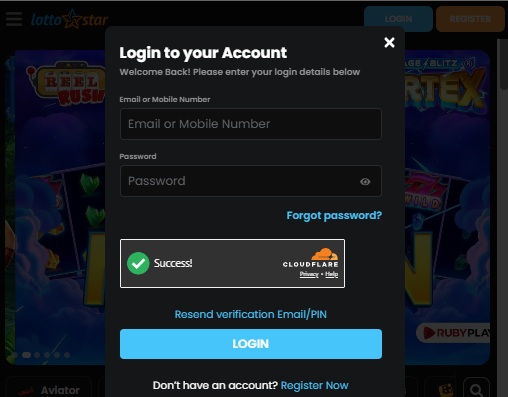
Lottostar Login to My Account
- Visit the Lottostar website at www.lottostar.co.za.
- Select the blue Login button.
- Enter your registered mobile number or email address.
- Enter your Lottostar password.
- Select Login to access your account.
Once logged in, you’ll be able to access your Lottostar balance, betting history, deposits, withdrawals, games and account information from the My Account area.

Forgotten Your Lottostar Login Password?
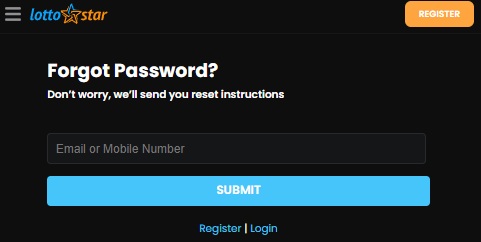
If you’ve forgotten your LottoStar login password, resetting it is quick and straightforward. From the LottoStar login screen, select the “Forgot Password?” option and you’ll be taken to the password reset page. Enter either the email address or mobile number linked to your LottoStar account and tap “Submit”. LottoStar will then send you instructions to reset your password and regain access to your account. Make sure you use the same email address or mobile number you originally registered with, otherwise LottoStar won’t be able to locate your account.
Setting Up an Account on Lottostar
The first step involves creating a Lottostar account. Once the account is successfully set up, you can log in. Here are the simple steps to create and log into your account. For a comprehensive understanding of Lottostar, read our detailed full Lottostar review.
Creating a Lottostar Account
- Navigate to the Lottostar website at www.lottostar.co.za.
- Click the ‘Register’ button located at the top right corner of the site.
- Fill in the required details such as First Name, Last Name, Contact Number, Password, etc.
- Check the boxes to agree to Lottostar’s terms and conditions and to opt-in or out of news updates.
- Click the ‘Register’ button to finish your registration process.

Logging Into Your Lottostar Account
- Navigate to the Lottostar website at www.lottostar.co.za.
- Click the blue ‘Login’ button.
- Input your Mobile Number/Email and Password.
- Click the ‘Login’ button to access your account.

Depositing Funds Into Your Lottostar
Account Before placing your Lottostar bet, you must ensure you have sufficient funds in your account. Here’s a quick guide on how to deposit funds into your account:
- Log into your Lottostar account.
- Click the orange ‘Deposit’ button, located on the top right corner of the site.
- Select your preferred deposit method.
- Input the amount you wish to deposit.
- Depending on your chosen deposit method, enter your banking details or voucher number.
- Click the ‘Deposit’ button to complete the deposit process.
Placing a Bet on Lottostar
Once you’ve completed the previous steps, you can now place your bet. Here’s a simple guide on how to do that:
- Step 1: Log into your Lottostar account.
- Step 2: Browse the website and select a game you’d like to bet on.
- Step 3: Click on your chosen game.
For this guide, we’ll use a Reel Rush Game called Hot Hot Fruit as an example.
- Step 4: Click on the game, wait for it to load, and then accept the Bet – Symbol Prediction conditions set by Lottostar.
- Step 5: Input the amount you wish to wager.
- Step 6: Choose a maximum bet or auto-play if you wish.
- Step 7: Press play to begin the game.
Withdrawing Your Winnings from Lottostar
After placing your bet, you might win and want to know how to withdraw your winnings. Follow these simple steps to complete your withdrawal:
- Log into your Lottostar account.
- Click the Profile icon (top right corner on mobile) or ‘My Account’ (if using a PC).
- Click ‘Withdraw’ on the side menu.
- Select your preferred withdrawal method.
- Input the amount you wish to withdraw.
- Input your banking details.
- Click ‘Withdraw’ to finalize your withdrawal.

The Gambler’s Thoughts on the Lottostar Login
Logging into Lottostar is straightforward whether you’re using your mobile phone or computer. As long as you have access to the mobile number or email address registered to your account and know your password, you should be able to access My Account within a few seconds. If you’ve forgotten your password, Lottostar also provides a simple reset process using your registered email address or mobile number.
For more information about the platform, read our complete Lottostar review. You can also visit The Gambler for our latest South African betting guides, reviews and promotions. If you’re looking for something to claim when opening a new account, check out our latest no deposit free spins offers available to South African players.

Lottostar Login FAQs
How do I login to my Lottostar account?
Visit Lottostar, select the blue Login button and enter the mobile number or email address registered to your account along with your password. Select Login to access My Account.
Can I login to Lottostar with my mobile number?
Yes. Lottostar allows you to login using the mobile number registered to your account. You can also use your registered email address together with your password.
What do I do if I forgot my Lottostar password?
Select “Forgot Password?” on the Lottostar login screen. Enter your registered email address or mobile number, select Submit and follow the password reset instructions sent to you.
Why is my Lottostar login not working?
First check that you’re using the correct mobile number or email address and password. If the details are correct but you still can’t login, try resetting your password or contact Lottostar support for help with your account.
Where can I find Lottostar My Account?
Once you’ve successfully logged in, you can access My Account through the account or profile section. From here you can manage your personal information and access features such as deposits, withdrawals and your account activity.
Can I register a new Lottostar account online?
Yes. Select Register on the Lottostar website and complete the online registration form with your personal and contact details. Once your account has been created, you can use your registered details to login.
Warren’s been in the betting game for over 15 years, testing sites, chasing bonuses, and figuring out what actually pays and what doesn’t. He’s spent plenty of time on Spina Zonke, with Hot Hot Fruit being a long-time favourite. At The Gambler, he shares real, straight-talking insights to help South African players get more value from their play and stay away from the sites that aren’t worth it.