

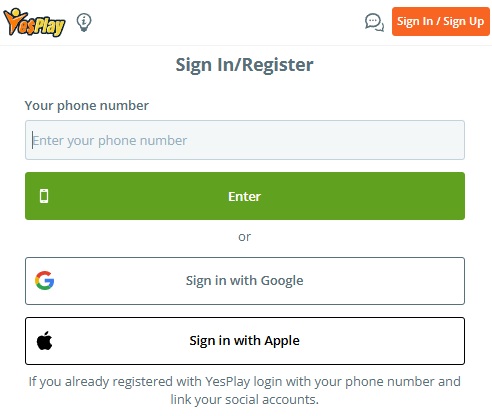
Logging into YesPlay is quick whether you’re using your phone, computer or the YesPlay mobile app. The current YesPlay sign-in page starts with your registered cellphone number, and it also offers Google and Apple sign-in options. If you already have an account, YesPlay specifically recommends logging in with your phone number first and then linking your social accounts if you want to use them in future. In this updated YesPlay login guide, we’ll show you exactly how to access your account, use the mobile and app login, reset a forgotten password and troubleshoot the most common YesPlay login problems. We’ve kept the focus firmly on getting you into your YesPlay My Account area rather than covering all the sports, slots and other features available on the site.
How to do a YesPlay Login
The YesPlay login process can be completed in a few steps from either your mobile phone or desktop computer.
- Visit the YesPlay website at www.yesplay.bet.
- Select the Sign In / Sign Up button.
- Enter the South African cellphone number connected to your YesPlay account.
- Select Enter to continue.
- Enter your YesPlay password.
- Select Sign In to access your account.
The current YesPlay login screen also provides Sign in with Google and Sign in with Apple options. If you’ve already linked one of these accounts, you can use it as an alternative way of accessing YesPlay.
YesPlay Mobile Login
You don’t need to download anything to use YesPlay on your phone. Open the YesPlay website through Chrome, Safari or your preferred mobile browser and select Sign In / Sign Up. Enter the cellphone number associated with your account, followed by your password, and you’ll have access to the same YesPlay account you use elsewhere. There isn’t a separate account for mobile users, so your balance and account details remain linked to your normal YesPlay profile. This makes the browser login the easiest option if you don’t want to install the YesPlay app.

YesPlay App Login
YesPlay also has an official mobile application, the Yesplay App, and the company currently provides downloads for both Android and Apple devices. Android users can download the APK through YesPlay’s official website and install it by following the on-screen instructions. Once installed, you don’t need to create another account. Open the app and use the details associated with your existing YesPlay account. If you’re only interested in accessing your account quickly, however, downloading the app isn’t essential. The mobile website remains available directly through your browser.
Forgot Your YesPlay Password?
Forgetting your YesPlay password is one of the more common reasons players struggle to access their accounts, but you shouldn’t create another account to get around the problem. Head to the YesPlay login area and use the password recovery option. You’ll need access to the cellphone number associated with your YesPlay account so that your identity can be confirmed before setting a new password. YesPlay’s own account FAQ includes a dedicated process for customers who have forgotten their passwords. Once you’ve changed the password, return to the YesPlay login screen and sign in using your registered cellphone number and new password.

YesPlay Login Not Working?
If your YesPlay login isn’t working, first make sure you’re using the cellphone number attached to your account and that your password has been entered correctly. Passwords are easy to mistype on mobile, so check your details before assuming there is a problem with the account.
If the details look correct, refresh the YesPlay website and try again. You can also close and reopen your browser, clear your browser cache or switch between Wi-Fi and mobile data. Trying another browser or device can also help establish whether you’re dealing with an account problem or simply a technical issue on your current device.
If you’ve forgotten your password, use the recovery option instead of repeatedly attempting different passwords. An account may also be restricted if YesPlay has been unable to verify your identity. Its current terms state that YesPlay can suspend an account until satisfactory identity verification has been completed, so an outstanding FICA requirement could require additional attention.
If none of these steps solves the problem, contact YesPlay directly. Its current terms list support@yesplay.bet and the official website Live Chat as its authorised customer support channels, with support available seven days a week.

YesPlay My Account
Once your YesPlay login is complete, your account is where you’ll manage the important parts of your profile. Rather than having different accounts for different areas of YesPlay, everything is connected to the same customer account.
It’s particularly important to keep the cellphone number associated with your account secure. YesPlay’s current terms state that your cellphone number is used as a unique method of identifying you, and customers are responsible for keeping both their mobile device and login information confidential.
You should therefore never give your YesPlay password or account access to somebody else. YesPlay states that accounts are for personal use and can be suspended if they’re being used by another person.
How to Register if You Don’t Have a YesPlay Account
If you’ve landed on this guide searching for the YesPlay login but haven’t actually registered yet, you can create an account through the same Sign In / Sign Up area.
Visit YesPlay and enter your South African cellphone number. The system will identify that you don’t already have an account and take you through the registration process. YesPlay’s current terms confirm that registration is available through both yesplay.bet and the official YesPlay mobile app.
You’ll also need to complete the required identity verification. YesPlay states that it is required under FICA to establish and verify customers’ identities and may request documents such as a South African ID, passport or driver’s licence.
Make sure you register using your own cellphone number and correct personal details. Getting this right from the beginning makes future logins, FICA verification and account recovery considerably easier.

The Gambler’s Thoughts on the YesPlay Login
YesPlay has kept its login system fairly simple. For most players, all you’ll need is the cellphone number associated with your account and your password. You can access the same account through desktop, your mobile browser or the YesPlay app, while Google and Apple sign-in provide additional options once linked.
If you’re having trouble logging in, we’d start with the simple fixes before contacting support. Double-check your number and password, try another browser and reset your password if necessary. If the problem is linked to FICA, an account restriction or information that needs to be changed, use YesPlay’s official support channels rather than opening another account.
Visit The Gambler for more betting news, guides and insights. You can also explore our list of the best casino sites in South Africa, or check out our latest no deposit free spins offers currently available. Best of luck with your betting!
Frequently Asked Questions
How do I login to YesPlay?
Visit YesPlay, select Sign In / Sign Up and enter the cellphone number associated with your account. Continue and enter your password to access your account.
Can I use YesPlay mobile login without the app?
Yes. You can log into YesPlay directly through the browser on your Android phone or iPhone. The app isn’t required to access your account.
Can I login to YesPlay with Google or Apple?
Yes. The current YesPlay sign-in page provides both Google and Apple login options. Existing customers can log in with their phone number and link their social accounts.
What do I do if I forgot my YesPlay password?
Use the password recovery option from the YesPlay login area and follow the instructions to reset your password. Don’t create a second account just because you’ve forgotten your existing login details.
Why is my YesPlay login not working?
Check your cellphone number and password first, then try refreshing the page, clearing your browser cache or using another device. Account verification or FICA issues can also result in restrictions.
Does YesPlay have an app?
Yes. YesPlay currently offers its mobile app for Android and Apple devices, with the official Android APK available through the YesPlay website.
How do I contact YesPlay if I can’t login?
YesPlay’s current terms list support@yesplay.bet and Live Chat on its official website as the authorised customer support channels. Support is available seven days a week.
Warren’s been in the betting game for over 15 years, testing sites, chasing bonuses, and figuring out what actually pays and what doesn’t. He’s spent plenty of time on Spina Zonke, with Hot Hot Fruit being a long-time favourite. At The Gambler, he shares real, straight-talking insights to help South African players get more value from their play and stay away from the sites that aren’t worth it.