

Looking to log in to your BetCity South Africa account? Existing customers can access BetCity using the mobile number and password they created when registering. The BetCity website is designed to work directly through your mobile browser, so there’s no need to download an app just to access your account. In this BetCity login guide, we’ll show you how to sign in on mobile, reset a forgotten password, troubleshoot common login problems and contact BetCity customer support if you still can’t get into your account. We’ll also explain how to register if you’re visiting BetCity for the first time.
How to Login to BetCity
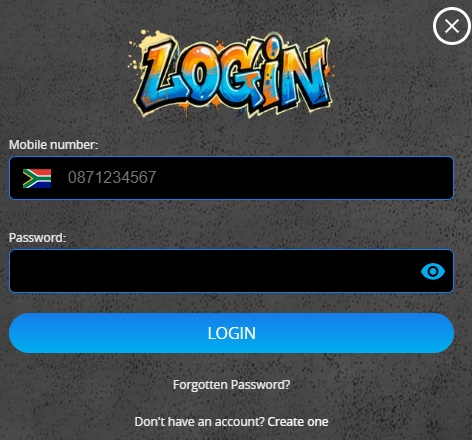
BetCity keeps its login process pretty simple. You’ll need the South African mobile number registered to your account together with your password.
To complete your BetCity login:
- Visit the BetCity website at www.betcity.co.za
- Select the pink Login button at the top of the screen.
- Enter the South African mobile number registered to your BetCity account.
- Enter your password.
- Select Login to access your account.
The mobile number field is set up for South African numbers, with the SA flag displayed alongside the number. Make sure you’re using the same mobile number you originally registered with.
Once you’re logged in, you’ll be able to access your BetCity account and use the site’s sports, live in-play, casino games, crash games and Lucky Numbers sections. You can also manage your bets and other account features from the mobile navigation.

BetCity Mobile Login
BetCity is very much a mobile-focused betting site. In fact, BetCity states that its service is built to work directly from your phone, with no app download required.
- Simply open www.betcity.co.za in your mobile browser and tap Login. Enter your registered mobile number and password, then select Login to access your account.
This means you don’t need a separate BetCity app login or another set of account details. Everything can be accessed through the mobile website using the account you’ve already registered.

Forgotten Your BetCity Login Password?
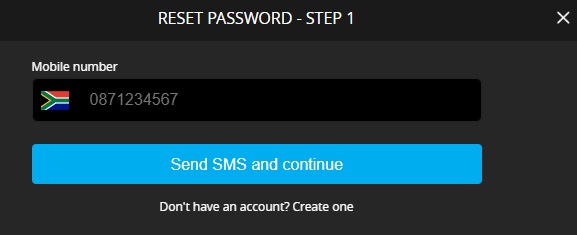
If you’ve forgotten your BetCity password, don’t keep guessing it. There’s a password reset option directly underneath the login form.
- Select Forgotten Password? and BetCity will open its Reset Password page. Enter the mobile number registered to your BetCity account and select Send SMS and continue.
- BetCity will then use your registered mobile number to continue the password reset process. Once you’ve successfully created a new password, return to the login page and use your mobile number together with your new password to sign in.
If you’re not receiving the SMS, double-check that you’ve entered the correct number associated with your account before requesting another reset.
BetCity Login Not Working?
If your BetCity login isn’t working, start with the basics. Check that you’ve entered your registered mobile number correctly and use the eye icon next to the password field to make sure there aren’t any typing mistakes in your password.
If you’re certain the password is wrong or you’ve forgotten it, use Forgotten Password? rather than repeatedly trying different passwords. You can also try closing and reopening your browser or clearing your browser’s cache if the BetCity website isn’t loading or responding correctly.
Account-related problems may require help from BetCity directly. This could include issues with your registered mobile number, account verification or an account that you can no longer access.

BetCity Customer Support
BetCity provides several ways to contact its customer support team if you can’t resolve your login problem yourself.
According to the current BetCity support page, you can contact them using:
- Email: help@betcity.co.za
- Phone: (+27) 10 976 8888
- WhatsApp: (+27) 63 600 6489
- Live Chat: Available through the BetCity website
For a login problem, have your account information ready so the support team can locate your account and help determine what’s preventing you from signing in.

Don’t Have a BetCity Account? How to Register
If you don’t already have an account, select the green Sign Up button at the top of the BetCity website. There’s also a Create one link directly underneath the login form for new customers.
Follow the registration process and provide the personal information requested by BetCity. Make sure the information you provide is accurate, particularly your South African mobile number and identification details, as these may be required for account and identity verification.
Once your account has been successfully created, you’ll be able to return to the BetCity login screen and access it using your registered mobile number and password.
BetCity states that it operates under a licence issued by the Mpumalanga Economic Regulator (MER). As with any South African betting account, registration and betting are restricted to customers aged 18 or older. If you’d like to know more before you sign up then check out our Betcity review.
The Gambler’s Thoughts on the BetCity Login
The BetCity login is refreshingly simple. There’s no username or account number to remember, you just need the South African mobile number attached to your account and your password. We also like that BetCity has made its site mobile-first, so you don’t have to download an app if you’d rather do everything through your phone’s browser.
The password reset process is equally straightforward, with an SMS-based recovery option available from the login screen. If that doesn’t solve your problem, BetCity provides phone, WhatsApp, email and live chat support, giving you several ways to get help with your account.
Visit The Gambler for more betting news, guides and insights. You can also explore our list of the best casino sites in South Africa, or check out our latest no deposit free spins offers currently available. Best of luck with your betting!

BetCity Login FAQs
How do I login to BetCity?
Visit www.betcity.co.za, select Login and enter your registered South African mobile number and password. Select Login again to access your account.
Can I login to BetCity with my mobile number?
Yes. The current BetCity login form asks for your registered mobile number together with your password.
Does BetCity have a mobile login?
Yes. You can log in directly through the BetCity mobile website using your phone’s browser. BetCity states that no app download is required.
What do I do if I forgot my BetCity password?
Select Forgotten Password? underneath the login form. Enter your registered mobile number and select Send SMS and continue to begin resetting your password.
Why is my BetCity login not working?
First check that your mobile number and password have been entered correctly. If you’ve forgotten your password, reset it by SMS. For account-specific problems, contact BetCity support.
How do I contact BetCity if I can’t login?
You can contact BetCity via live chat, email at help@betcity.co.za, phone on (+27) 10 976 8888 or WhatsApp on (+27) 63 600 6489.
Can I register a BetCity account online?
Yes. Visit the BetCity website and select Sign Up, or select Create one underneath the login form, then follow the registration process.
Warren’s been in the betting game for over 15 years, testing sites, chasing bonuses, and figuring out what actually pays and what doesn’t. He’s spent plenty of time on Spina Zonke, with Hot Hot Fruit being a long-time favourite. At The Gambler, he shares real, straight-talking insights to help South African players get more value from their play and stay away from the sites that aren’t worth it.