

Looking to login to your SportyBet South Africa account? Existing customers can access their account using the mobile number and password they created when registering. The same SportyBet login works across desktop, mobile and the SportyBet app, so you don’t need to create separate accounts for different devices.
In this SportyBet login guide, we’ll show you how to sign in using your mobile number, access SportyBet on your phone, reset a forgotten password and troubleshoot common login problems. We’ll also explain where to find My Account once you’re logged in and how to register if you don’t already have an account.
How to Login to SportyBet South Africa
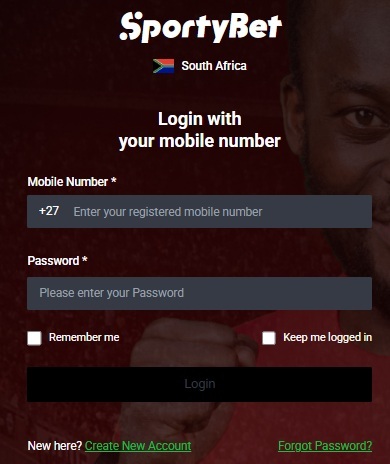
SportyBet keeps its login process pretty simple. As shown on the current South African login screen, you’ll need the mobile number registered to your account and your SportyBet password.
To login:
- Visit the SportyBet South Africa website at www.sportybet.co.za.
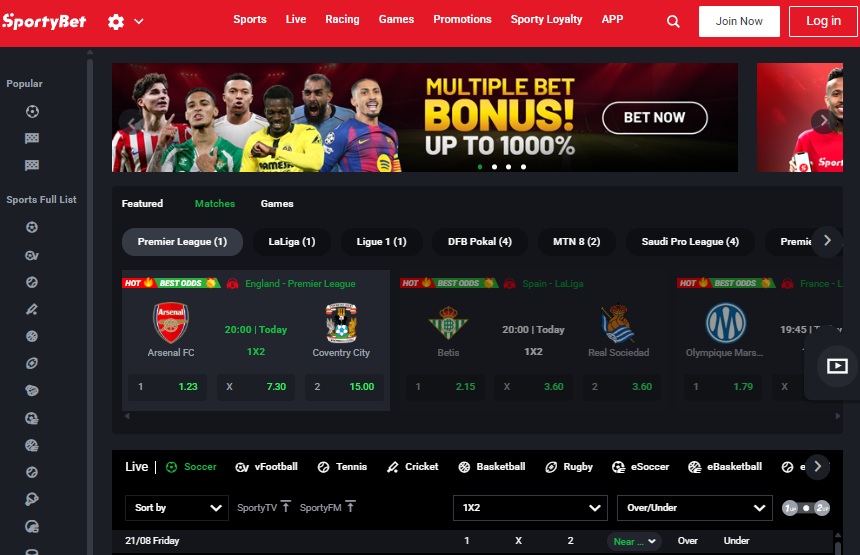
- Select Log in at the top right of the homepage.
- Enter your registered South African mobile number in the Mobile Number field.
- Enter your SportyBet password.
- Choose Remember me or Keep me logged in if you’re using your own private device and want SportyBet to remember your login.
- Select Login to access your account.
Make sure you’re entering the same mobile number you originally used to register. The current SportyBet login form uses a +27 South African country code before the mobile number field. Once your details have been accepted, you’ll be taken back into SportyBet where you can access your account and continue using the site.

SportyBet Mobile Login
You don’t need the SportyBet app just to login from your phone. The SportyBet website is designed to work on modern mobile browsers, so you can sign in using Chrome, Safari or another supported browser.
Open www.sportybet.co.za on your phone, tap Log in and enter your registered mobile number and password. Your SportyBet account is the same regardless of whether you access it from a computer or mobile device.
This is useful if you don’t want to install another betting app on your phone. You still have access to your account, balance, sports markets, live betting and account management through the mobile website.
SportyBet also provides the Remember me and Keep me logged in options on its login screen. We’d only use these on a personal phone. If you’re accessing SportyBet from a shared device, leave them unchecked and log out when you’re finished.
SportyBet App Login
SportyBet offers mobile apps for Android, iOS and Huawei users. If you’ve already installed the app, you don’t need to register again. Open the SportyBet app, select the login option and use the same registered mobile number and password you use on the SportyBet website.
This is an important point for anyone moving between devices. Your SportyBet account isn’t tied exclusively to the phone or computer you registered on. Your account details remain the same, so you can access the same balance and account from the SportyBet app or website.
Forgot Your SportyBet Password?
If you’ve forgotten your SportyBet login password, don’t keep guessing it. SportyBet provides a dedicated password reset option directly from the login screen.
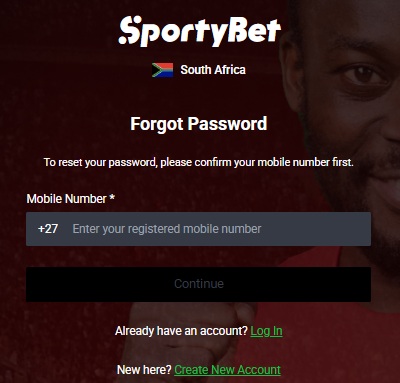
- Select Forgot Password? underneath the SportyBet login form. You’ll be taken to a page asking you to confirm your mobile number first.
- Enter the South African mobile number registered to your SportyBet account and select Continue. Follow the instructions SportyBet provides to verify your account and create a new password.
- Make sure you enter the mobile number attached to your existing account. Using a different number won’t allow SportyBet to identify the account you’re trying to recover.
- Once your password has been successfully changed, return to the login screen and sign in with your registered mobile number and new password.
SportyBet Login Not Working?
If your SportyBet login isn’t working, start with the basics before assuming there’s something wrong with your account.
- Check that you’ve entered the correct registered mobile number and password. Passwords need to be entered accurately, so look for simple mistakes such as incorrect characters or your phone automatically inserting something into the field.
- If you’re certain the mobile number is correct but can’t remember the password, use Forgot Password? rather than repeatedly attempting to login.
- Browser problems can also occasionally interfere with a login. Reload SportyBet, close and reopen your browser, or clear the site’s cached data before trying again. You can also try accessing SportyBet through another browser or switching between WiFi and mobile data to rule out a connection problem.
- If you’re using the SportyBet app, make sure you have the latest available version installed. Alternatively, try logging into the mobile website with the same credentials. If the website works but the app doesn’t, that points towards an app or device issue rather than a problem with your actual SportyBet account.
If you’ve completed these steps and still can’t access your account, contact SportyBet customer support rather than attempting to register another account.

SportyBet My Account
Once you’ve successfully completed your SportyBet login, you can access the account management features associated with your profile. This is where you can manage your balance and personal account information, review transactions and betting activity, make deposits, request withdrawals and deal with account verification where required.
SportyBet requires the personal information associated with an account to be accurate. You may also be required to complete identity or account verification checks, particularly when accessing certain account or withdrawal functions.
If SportyBet requests verification, provide the information requested through the official account verification process. Don’t create another SportyBet account simply because verification is pending on your existing one.

The Gambler’s Thoughts on the SportyBet Login
SportyBet has kept its South African login process refreshingly straightforward. There’s no username or account number to remember, you simply use the South African mobile number registered to your account together with your password. The same account can then be accessed from desktop, the mobile website or SportyBet’s apps.
Based on our experience using South African betting sites, we’d recommend keeping your registered mobile number up to date and completing any verification requests as early as possible. Those two things can save a lot of hassle when you eventually need to manage or withdraw funds from your account.
Visit The Gambler for more betting news, guides and insights. You can also explore our list of the best casino sites in South Africa, or check out our latest no deposit free spins offers currently available. Best of luck with your betting!
SportyBet Login FAQs
How do I login to SportyBet South Africa?
Visit SportyBet.co.za, select Log in and enter your registered South African mobile number and password. Select Login to access your account.
What details do I need for my SportyBet login?
SportyBet’s current South African login form asks for your registered mobile number and password. You don’t need a separate username to access your account.
Can I login to SportyBet without the app?
Yes. SportyBet’s mobile website allows you to login directly through your phone’s browser. You don’t need to download the app to access your account.
Can I use the same SportyBet login on mobile and desktop?
Yes. Your registered mobile number and password give you access to the same SportyBet account across supported devices.
What do I do if I forgot my SportyBet password?
Select Forgot Password? on the SportyBet login screen and enter your registered mobile number. Follow SportyBet’s account verification instructions to reset your password.
Why is my SportyBet login not working?
First check your mobile number and password for mistakes. If they’re correct, try resetting your password, refreshing your browser or accessing SportyBet from another browser or device.
Where can I find SportyBet My Account?
Login to SportyBet first, then open your account area. From there you can access account information and features such as your balance, deposits, withdrawals and transaction activity.
Is SportyBet licensed in South Africa?
Yes. SportyBet is operated by Enziglo (Pty) Ltd and licensed by the Mpumalanga Economic Regulator under licence number 9-2-1-09799.

Warren’s been in the betting game for over 15 years, testing sites, chasing bonuses, and figuring out what actually pays and what doesn’t. He’s spent plenty of time on Spina Zonke, with Hot Hot Fruit being a long-time favourite. At The Gambler, he shares real, straight-talking insights to help South African players get more value from their play and stay away from the sites that aren’t worth it.