

Logging in to your Play.co.za account is quick and hassle free, whether you are using a laptop, phone, or tablet. There is no app to download and no complicated steps. Everything works directly through your browser, making it easy to access your balance, games, and bonuses in seconds. This guide walks you through the full Play.co.za login process, explains how to reset your password if you get stuck, and covers the most common login problems South African players run into, along with simple fixes.
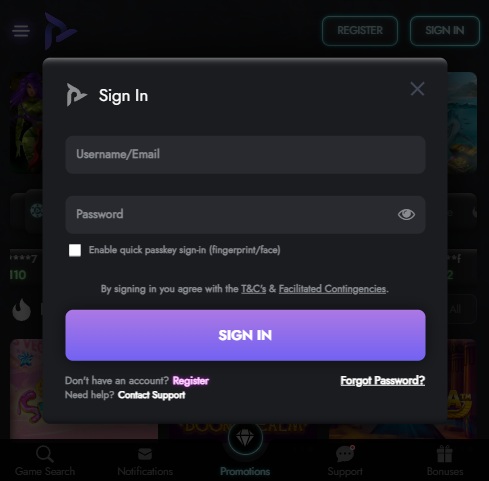
The play.co.za login page
How to Log In to Play.co.za
If you have not registered yet, you will need to create an account first, click here to open an account. Once that is done, this guide shows you the fastest and safest way to sign in every time.
Signing in takes less than a minute if you have your details ready.
- Start by opening your browser and going directly to play.co.za. On the homepage, you will see the Sign In button at the top right of the screen. Tap or click it to open the login form.
- Enter the email address or mobile number you used when registering, followed by your password. Make sure Caps Lock is off and that there are no extra spaces, especially if you are copying and pasting.
- Once your details are entered, click Sign In. You will be taken straight to your account dashboard, where you can deposit, withdraw, claim bonuses, or start playing.
If this is your first login, you may also be prompted to choose your welcome bonus package before continuing.
Forgot Your Play.co.za Password?
Forgetting your password is common, especially if you do not log in often. Thankfully, Play.co.za makes the reset process simple.
- On the login screen, click Forgot Password below the password field. Enter the email address or mobile number linked to your account, then submit the request.
- You will receive a reset link or code by email or SMS. Open it, create a new password, confirm it, and log in again straight away.
If you cannot remember which email or phone number you used, you will need to contact support so they can verify your identity and help you regain access.

Logging In on Mobile
Play.co.za does not have a dedicated mobile app, but the mobile site works extremely well on both Android and iOS devices. Most players actually log in from their phones.
- Open your mobile browser and go to play.co.za. The site automatically loads the mobile version. Tap Sign In, enter your email or phone number and password, then log in as normal.
- For quicker access in future, you can add Play.co.za to your home screen. This creates an app-like shortcut without installing anything and makes logging in even faster.
Common Play.co.za Login Problems and Fixes
If your login is not working, it is usually something small.
- Incorrect password errors are often caused by Caps Lock being on or an outdated saved password. Retype your details carefully or use the password reset option.
- If your account is not found, try logging in with both your email and your mobile number. Some players forget which one they used during registration.
- Pages that do not load properly are usually caused by browser cache issues or a weak internet connection. Clearing your cache, switching browsers, or changing from WiFi to mobile data often fixes this.
- If your account is suspended or restricted, it is normally due to pending FICA verification. In this case, contact support so they can guide you through the next steps.

Keeping Your Play.co.za Account Secure
Your Play.co.za account holds real money, so basic security habits matter.
- Always use a strong, unique password and never share your login details with anyone. Play.co.za staff will never ask for your password by email, phone, or chat.
- Log out when using shared devices and keep your email account secure, since password resets are sent there.
- Completing your FICA verification also adds an extra layer of protection and ensures faster withdrawals later on.
What You Can Do After Logging In
Once signed in, everything is accessible from your dashboard.
You can deposit or withdraw using South African payment methods like EFT, Ozow, Capitec Pay, and vouchers. New players can select a welcome bonus of up to R9,000 across multiple deposits. From the same area, you can play casino games, place sports bets, join cash challenges, upload FICA documents, and manage your account details.
Need Help With Your Login?
If you are still stuck after trying the steps above, the Play.co.za support team can help. Live chat is the fastest option and is available directly on the website. You can also email support@play.co.za or call their support line during business hours. When contacting support, have your full name and registered phone number ready so they can assist you faster.

Final Thoughts
Play.co.za keeps the login process simple, fast, and mobile friendly. With no app required and a clean, secure platform, signing in takes seconds once your account is set up. If you ever forget your password or run into issues, the recovery tools and local support make it easy to get back in and continue playing. Visit The Gambler for more betting guides, tips, and the latest offers. We also recommend checking out our list of the best casino sites in South Africa to compare platforms and bonuses. Best of luck with your betting!

Warren’s been in the betting game for over 15 years, testing sites, chasing bonuses, and figuring out what actually pays and what doesn’t. He’s spent plenty of time on Spina Zonke, with Hot Hot Fruit being a long-time favourite. At The Gambler, he shares real, straight-talking insights to help South African players get more value from their play and stay away from the sites that aren’t worth it.