

Looking for the Jackpot City login in South Africa? Existing customers can access their Jackpot City account using the mobile number and password registered to their account. The same account can be accessed from your phone or computer, so you don’t need separate login details for different devices. In this guide, we’ll show you how to login to Jackpot City, access your account, reset a forgotten password and deal with common login problems. If you don’t have an account yet, we’ve also included the Jackpot City registration process further down.

How to Login to Jackpot City South Africa
If you already have a Jackpot City account, logging in only takes a few steps:
- Visit www.jackpotcity.co.za.
- Select Login at the top of the page.
- Enter the mobile number registered to your Jackpot City account.
- Enter your password.
- Check that you’ve entered the correct details.
- Select Login to access your account.
Once logged in, you’ll be able to access your balance, games, promotions, deposits and withdrawals, along with the other features associated with your Jackpot City account. We recommend using the official Jackpot City South Africa website rather than searching for the login page every time. This also reduces the chance of entering your account information on the wrong website.
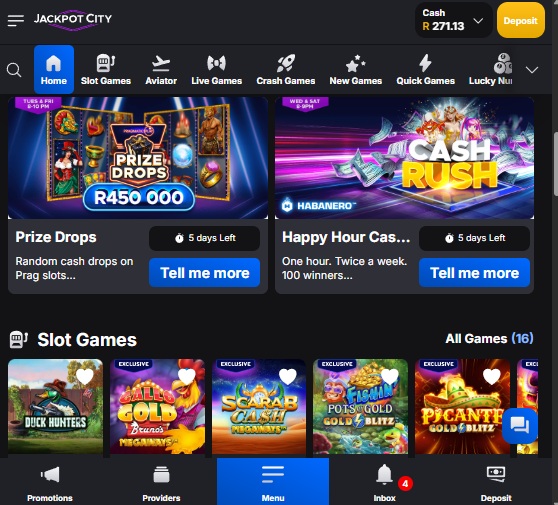
Jackpot City Login on Mobile
You can login to Jackpot City from your mobile phone using the same account details you use on desktop. Open the Jackpot City website on your Android phone or iPhone, select Login and enter your registered mobile number and password.
You don’t need to register another account when changing devices. Your existing Jackpot City account, balance and account information remain associated with the same login. If you prefer using an app, we’ve also put together a separate Jackpot City app guide covering the mobile options in more detail.
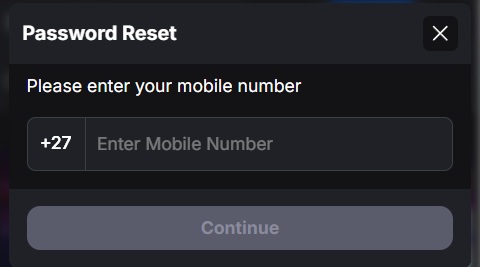
Forgot Your Jackpot City Password?
If you’ve forgotten your Jackpot City password, don’t create another account. Use the password recovery option from the login page instead.
To reset your Jackpot City password:
- Visit the Jackpot City South Africa website.
- Select Login.
- Choose the Forgot Password option.
- Enter the information requested for your account.
- Follow the verification instructions provided by Jackpot City.
- Create a new password.
- Return to the Jackpot City login and try again.
Make sure you’re attempting to recover the account using the details originally associated with it. If you no longer have access to your registered mobile number or can’t complete the recovery process, contact Jackpot City support for assistance.
Why Can’t I Login to Jackpot City?
If the Jackpot City login isn’t working, first check that you’ve entered the correct mobile number and password. A saved password in your browser can also cause problems if you’ve changed your password recently, so try entering it manually.
- If the website itself isn’t loading correctly, refresh the page or try switching between Wi-Fi and mobile data. You can also try another browser to establish whether the problem is with the website or your device.
- If you’ve forgotten your password, use the password recovery option rather than repeatedly guessing it. Existing customers should also avoid registering another account simply because they can’t access their original one.
If none of these steps solve the problem, contact Jackpot City customer support and ask them to check the status of your account.

Jackpot City Registration for New Customers
If you’ve searched for the Jackpot City login but haven’t registered yet, you’ll need to create an account before you can login.
The registration process is separate from logging into an existing account:
- Visit www.jackpotcity.co.za.
- Select Register.
- Enter your mobile number.
- Create a secure password.
- Enter your first name and surname.
- Provide your email address and the other personal information requested.
- Enter the required identification details.
- Read and accept the applicable terms.
- Complete the registration and any required verification.
Make sure the personal information you provide is accurate and matches your identification documents. This can save unnecessary problems when your account needs to be verified later. Once registration is complete, you can return to Jackpot City and login using the details associated with your new account.

Jackpot City Bonuses for New Players
Jackpot City regularly runs promotions for new and existing customers, but bonus offers and their conditions can change. Rather than repeating a potentially outdated welcome offer on a login page, we recommend checking the current promotion before registering or depositing. We also have a dedicated Jackpot City free spins and bonus guide where we cover the current offer in more detail.
Is the Jackpot City Login Safe?
Always check that you’re accessing the official Jackpot City South Africa website before entering your mobile number and password. Avoid entering your account details through unfamiliar websites or links sent to you by someone you don’t know. Your password and account verification information should also be kept private. If you’re using a shared or public device, don’t allow the browser to save your password and remember to log out when you’re finished.
The Gambler’s Thoughts
The Jackpot City login itself is straightforward once you already have an account. Existing customers need their registered mobile number and password, and the same account can be accessed across compatible mobile and desktop devices.
The main thing we’d avoid is creating another account when you’re actually having trouble accessing an existing one. Start with the password recovery process and make sure you’re using the mobile number associated with your original account. If that doesn’t work, contact Jackpot City support.
We’ve covered Jackpot City for years, including its casino games, promotions and mobile options. If you want to go beyond simply logging in, our Jackpot City review takes a much deeper look at the platform.
Visit The Gambler for more South African betting guides, reviews and promotions. You can also compare the latest no deposit free spins currently available.
Jackpot City Login FAQs
How do I login to Jackpot City?
Visit the Jackpot City South Africa website, select Login and enter the mobile number and password associated with your account.
Can I login to Jackpot City on my phone?
Yes. You can access your Jackpot City account from a compatible mobile device using the same account details.
What do I do if I forgot my Jackpot City password?
Use the Forgot Password option from the Jackpot City login page and follow the account recovery instructions.
Why is my Jackpot City login not working?
Check that your mobile number and password are correct. If you’ve forgotten your password, use the recovery option. Browser or connection problems can also sometimes prevent the login page from working correctly.
Do I need to register before I can login?
Yes. New customers must create a Jackpot City account before they can login for the first time. Existing customers should use their original account rather than registering again.
Is Jackpot City login the same on mobile and desktop?
You use the same Jackpot City account details whether you’re accessing the platform from a compatible mobile or desktop device.
Warren’s been in the betting game for over 15 years, testing sites, chasing bonuses, and figuring out what actually pays and what doesn’t. He’s spent plenty of time on Spina Zonke, with Hot Hot Fruit being a long-time favourite. At The Gambler, he shares real, straight-talking insights to help South African players get more value from their play and stay away from the sites that aren’t worth it.